
A better day starts at the counter.
Odoo POS, configured for your café, restaurant or retail counter. Set up, trained and supported by Nexum, with an assistant you can add later if you want one.
Sample data. No signup needed.
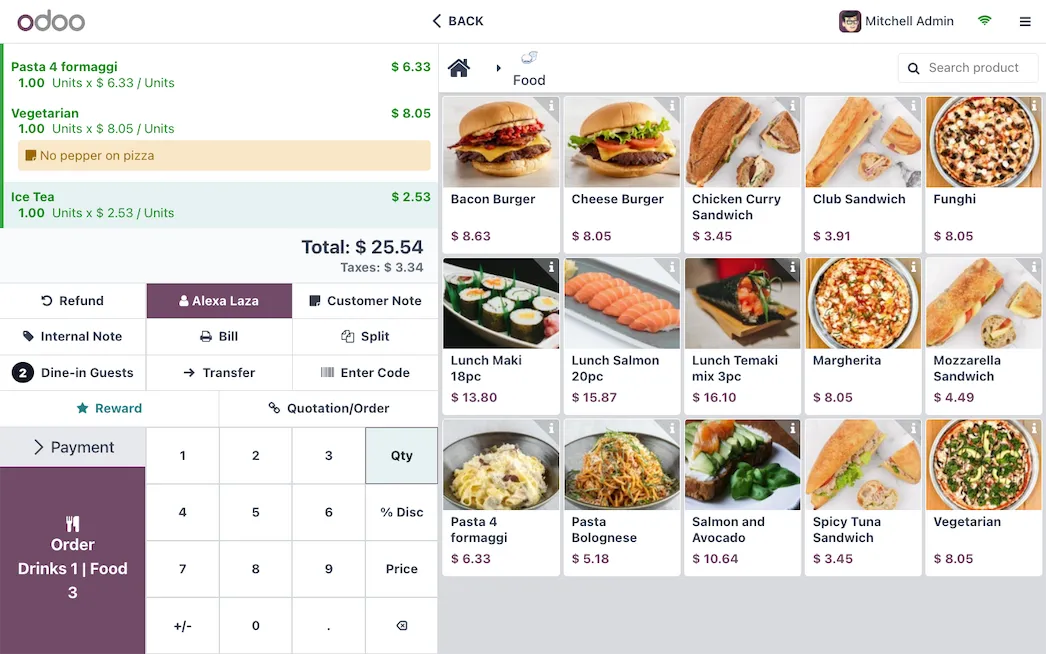
Everything behind a good sale.
A scoped engagement covers configuration, the data we agree to migrate, training and support.
Your menu, your way
Products, variants, modifiers, pricing and tax rules, configured around what you sell.
Hardware that works together
Receipt printers, cash drawers, barcode scanners and kitchen printers set up and tested with your POS.
A clearer view of stock
Sales and inventory in the same system, with the stock flows your business needs.
One outlet or several
Shared product records and reporting by outlet, so you can compare without combining spreadsheets.
A team ready to use it
Cashier and supervisor roles, permissions and hands-on training as part of the rollout.
Ready for real service
Tables, split bills and kitchen workflows, or retail scanning and returns, scoped to your operation.
Add an assistant later. Or not at all.
If you'd like daily summaries or stock alerts on your phone, a connected assistant can be scoped as an optional addition to your POS.
Before we get started.
Can I start with one outlet?
Yes. We scope the initial setup around the outlet, hardware and workflows you need today, and plan for more outlets when that becomes relevant.
What happens if the internet drops?
Odoo POS supports continued selling during temporary connectivity interruptions. We test the configured setup and explain which connected features and payment services still depend on internet access.
Do I need the AI assistant?
No. Odoo POS works on its own. A connected assistant is an optional addition that can be scoped with your POS or later.
How is pricing worked out?
Hardware, outlets, integrations, data migration and training all affect the scope. We confirm setup and recurring costs before work begins.
Less chasing.
More running your business.
Tell us how your business works. We'll help you find the right place to start.
A better day starts at the counter.
Odoo POS, configured for your café, restaurant or retail counter. Set up, trained and supported by Nexum, with an assistant you can add later if you want one.
Sample data. No signup needed.
Everything behind a good sale.
A scoped engagement covers configuration, the data we agree to migrate, training and support.
Your menu, your way
Products, variants, modifiers, pricing and tax rules, configured around what you sell.
Hardware that works together
Receipt printers, cash drawers, barcode scanners and kitchen printers set up and tested with your POS.
A clearer view of stock
Sales and inventory in the same system, with the stock flows your business needs.
One outlet or several
Shared product records and reporting by outlet, so you can compare without combining spreadsheets.
A team ready to use it
Cashier and supervisor roles, permissions and hands-on training as part of the rollout.
Ready for real service
Tables, split bills and kitchen workflows, or retail scanning and returns, scoped to your operation.
Add an assistant later. Or not at all.
If you'd like daily summaries or stock alerts on your phone, a connected assistant can be scoped as an optional addition to your POS.
Before we get started.
Can I start with one outlet?
Yes. We scope the initial setup around the outlet, hardware and workflows you need today, and plan for more outlets when that becomes relevant.
What happens if the internet drops?
Odoo POS supports continued selling during temporary connectivity interruptions. We test the configured setup and explain which connected features and payment services still depend on internet access.
Do I need the AI assistant?
No. Odoo POS works on its own. A connected assistant is an optional addition that can be scoped with your POS or later.
How is pricing worked out?
Hardware, outlets, integrations, data migration and training all affect the scope. We confirm setup and recurring costs before work begins.
Less chasing.
More running your business.
Tell us how your business works. We'll help you find the right place to start.